


Does CS2 Have Community Servers? – Counter-Strike Server Browser Explained

Daniel Morris

Share:

CS2 community servers are the backbone of the game. Whenever the normal Counter-Strike game modes aren’t interesting enough, it’s community servers that players turn to in order to find something fresh. But does CS2 have community servers? It’s a good question, given how many things broke when Valve moved to the new game a couple of years ago.

Does CS2 Have Community Servers? – Counter-Strike Server Browser Explained

The short answer is yes, CS2 community servers do exist, and yes, it’s easy to play them. We’re going to show you how to navigate the Counter-Strike server browser and find great CS2 community servers to play on. Whether it’s Surf, Retakes, or just plain old Deathmatch, the community servers CS2 has to offer have something for every type of player.

How to join CS2 Community Servers via server browser

When Counter-Strike 2 first launched, the in-game server browser appeared in the menu, but wasn’t actually functional. For those who wanted to play on CS2 community servers easily, this was understandably frustrating, leading many to wonder why the button even existed at all. Many asked, “Does CS2 have community servers at all?” A fair question. Now, though, the feature works as intended.

CS2 Community Servers

To join CS2 community servers via the server browser, follow these steps:

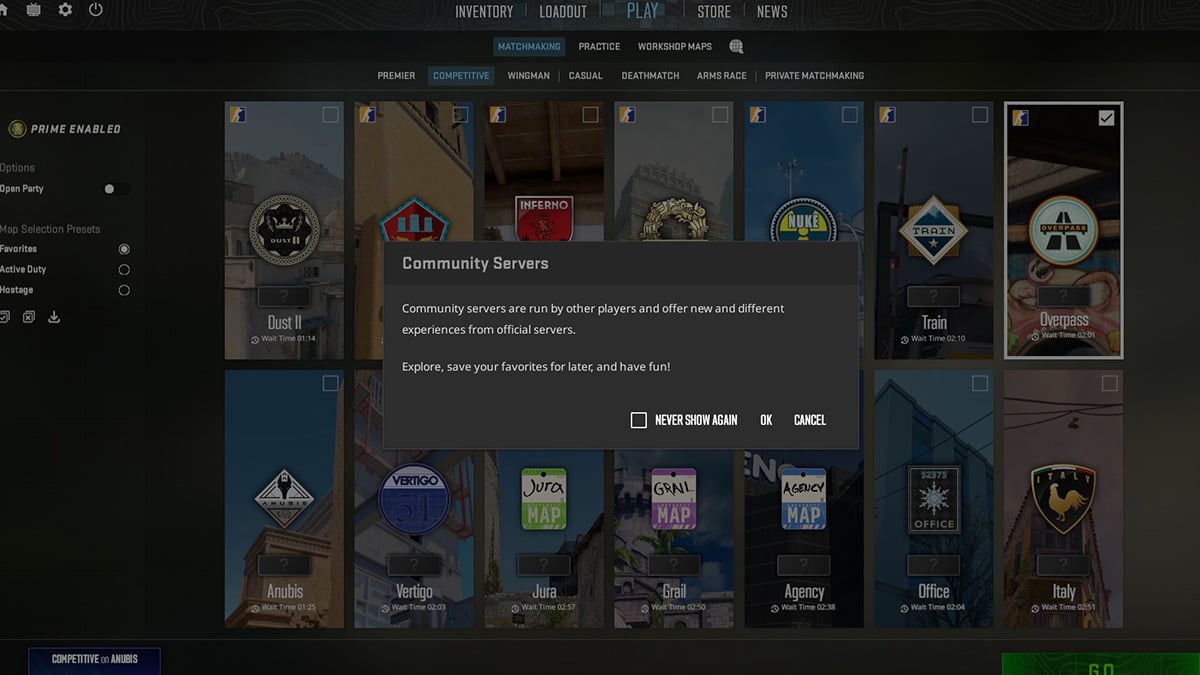
  • On the “Play” tab in the CS2 menu, click the small globe icon at the end of the row comprising Matchmaking, Practice, and Workshop Maps.
  • A pop-up will appear informing you about CS2 community servers – simply press OK.
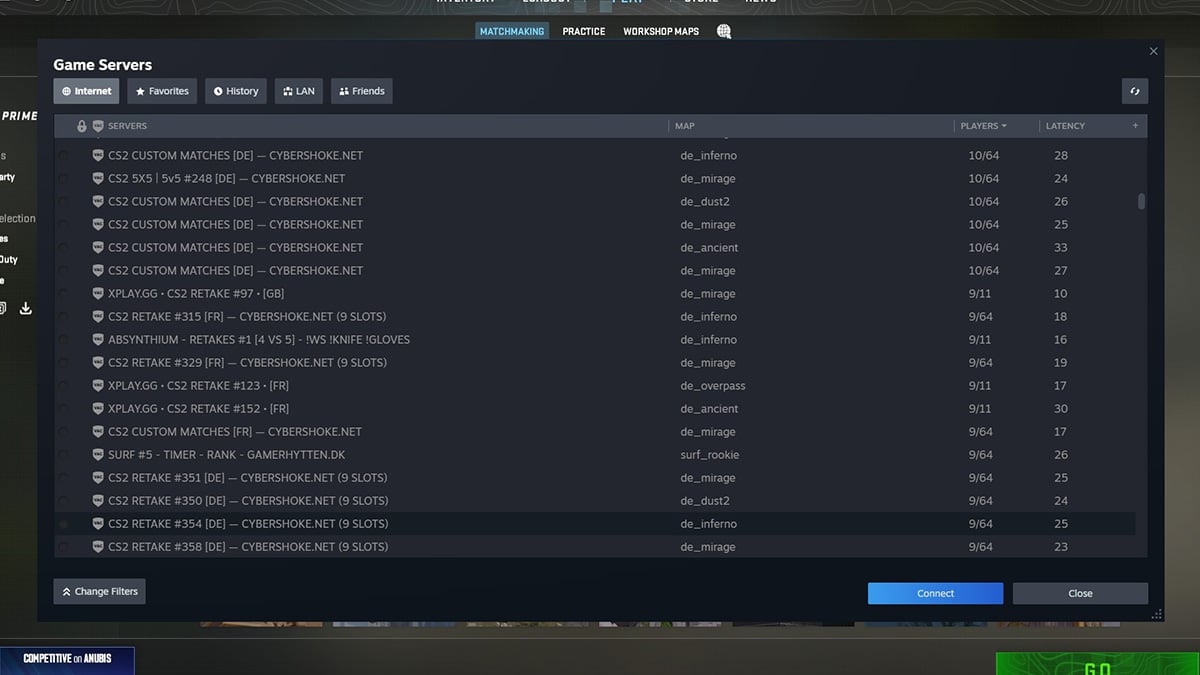
  • The CS2 server browser will appear in the Steam overlay, but will appear empty.
  • In the top-right corner, click the magnifying glass – this will populate the list of CS2 community servers.
  • If you want to search for a specific map or mode, press the Change Filters button. This will open up search boxes for both.
  • Then, it’s just a case of clicking Connect on the community server you want to play.
  • When loading, you may be asked whether you want to download custom content. If prompted, press yes.
  • Enjoy!

That might seem long-winded, but that entire process should only take you a couple of seconds, and you’re in playing on the best CS2 community servers around. But it’s not the only way to get involved.

CS2 Community Servers Browser

How to play CS2 Community Servers via IP

You can also connect to CS2 community servers directly using the IP. Personally, this is my preferred way to play community servers in CS2, as I find it much more intuitive, but it does involve going to third-party websites in the meantime.

Sites like Cybershoke and xplay are the main hosts of CS2 community servers with game modes like Retakes and Surf, and while they can all be found in the server browser, these services usually have their own websites with more details about their servers. From these sites, you’re able to copy the IP and connect directly to the community servers in CS2 that way.

  • Head to the website of your community server host.
  • Select the game mode and server you want to play on.
  • Copy the IP from the website.
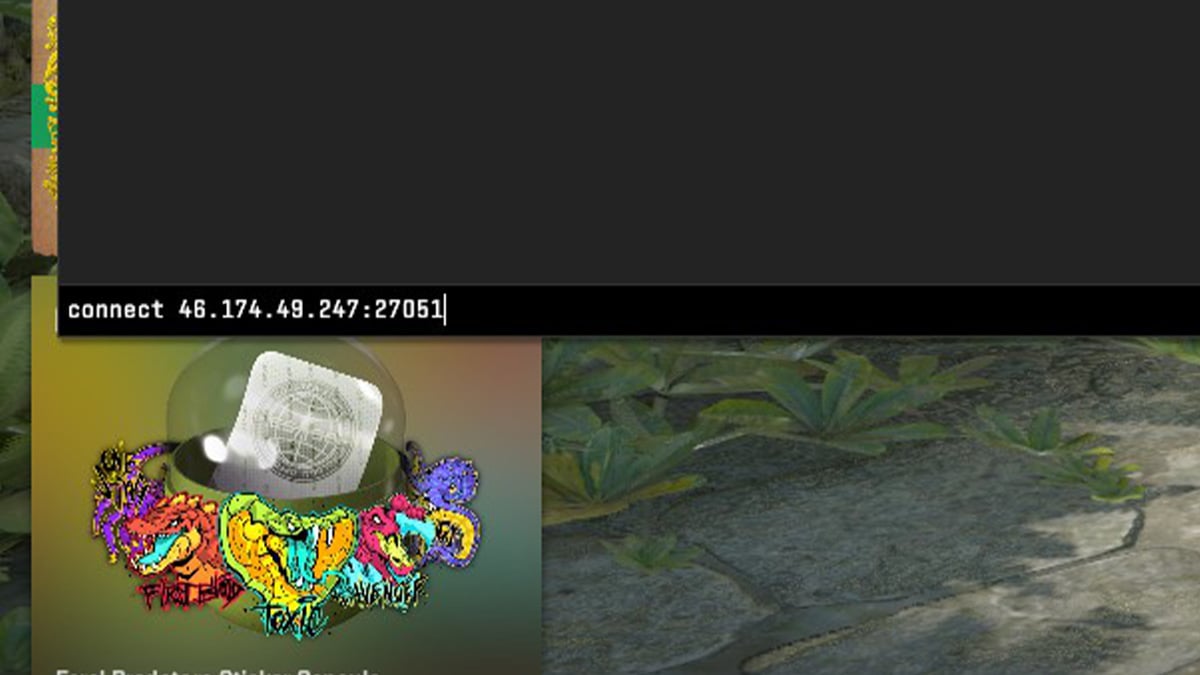
  • Open your CS2 console in-game with the tilde key (~).
  • Paste the IP with the “connect” command at the start (as pictured below).
  • Hit enter and download additional content if prompted.

CS2 Community Servers Join Via IP

And that’s it – all you need to know about CS2 community servers and how to play them with ease. Have fun!

Article Tags

No tags found

Tournaments

No tournaments found
Daniel Morris

Daniel Morris

Counter-Strike Content Lead
Daniel is a CS2 esports specialist, and now channels that expertise to discuss the game online. Despite his knowledge of Counter-Strike, he wasn’t quite good enough to go pro himself.
More from Daniel Morris >