

Riot Games rolls out VALORANT patch 11.06, bringing some of the most anticipated updates yet — chief among them, the brand-new Replay System now available across multiple modes. This patch also includes serious anti-bot efforts, performance improvements, especially for PC players, and a number of fixes across agents and platform features. If you’ve been waiting for smoother competitive play and the ability to rewatch your matches, this one delivers.
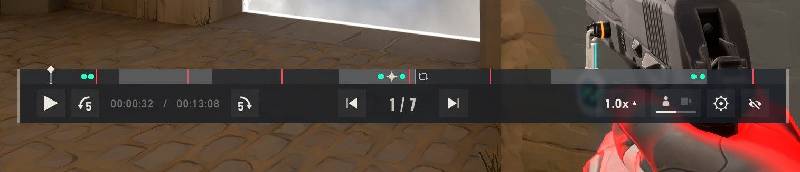
One of the biggest additions in Patch 11.06 is the launch of the Replay System, which is now enabled for Competitive, Unrated, Swiftplay, and Premier. Players can review their past games, analyze their plays, study opponent patterns, or just relive clutch moments. Riot strongly suggests checking the FAQ for full details — things like how far back you can view replays, what perspectives are available, and whether highlights are auto-generated or need manual marking.
Replays will become available on VALORANT PC starting with Patch 11.06 for all regions other than China.
Within a Replay file, players will be able to:

There are a few known issues with replays. Riot’s official patch notes state that they aim to fix some issues in future updates, while others ‘are inherent to replays in VALORANT and will continue to persist’.
Mini/Mega Map Fog of War – While players can toggle enemy outlines on or off to reflect the visual info available to each player’s first-person POV, they cannot hide that info from the minimap or megamap. So even if they can’t see an enemy behind a wall with outlines toggled off, they will still see them on the minimap.
Ability Minimaps – Ability minimaps like Brimstone’s Sky Smoke, Clove’s Ruse, Tejo’s Guided Salvo, Armageddon, etc. will not be viewable in a Replay. From that player’s first-person POV, they will see the Agent raise their hands when placing the abilities, but there will be no in-game map to see exactly where they’re being placed. Once the abilities are deployed, the minimap and in-game world will show the abilities.
Ability Placement Markers – Similar to the ability minimaps above, ability placement markers like KJ’s turret outline, Deadlock’s Sonic Sensor preview, Cypher’s Trapwire preview, etc will also not be viewable when a player is placing them in a Replay. They will see the player equip the ability and the animation when the ability is deployed, but no preview placement markers will be visible until the ability is placed.
On the Competitive front, Riot has taken a big swing against bots. Over the past six months, 40,000 bots have been banned from Competitive games. The goal: make matches feel more legitimate and reduce frustrating, non-human behavior in lobbies. Players should already be seeing fewer bot issues.
For PC players, perhaps the most relevant update is the change to input buffer settings. The RawInputBuffer setting has been removed from configurable options. Moving forward, it’ll always be enabled by default because of its performance gains. If you’ve ever tinkered with this setting, expect fewer stutters and a slightly cleaner input response.
Console players also get fixes: New Player Tips display behavior has been corrected, and a known issue around how dropped weapons or the Spike highlight when nearby (instead of when directly looked at) is acknowledged. However, that second issue remains unresolved and is expected to be addressed in Patch 11.07.
A rare but impactful bug involving visibility was fixed in this patch. Under very specific circumstances, Yoru and Reyna, after turning invisible, would reappear in their pre-invisibility location, despite moving during invisibility. That has been patched. Such bugs can be especially game-breaking in high-level or tight round situations, so this fix is likely to be welcomed especially by players who track position or rely on lineups and fakes.
And stay up to date on all the latest trends in esports
By submitting your information you agree to the Privacy Policy and Terms of Use